Your dives arrive on their own
Every sample of depth, speed, water temperature and heart rate is imported, deduplicated and saved to your private logbook — and for most watches you never touch a file:
- Suunto that pairs with the Suunto app (D5, EON, Ocean, Vertical, Race, 9…) — connect your Suunto account once and every dive, your whole history included, syncs automatically
- Garmin (including Descent) — plug it into this website over USB in Chrome or Edge and every dive is read straight off the watch; or export a file from Garmin Connect
- Shearwater, Mares, Cressi, Oceanic, older cabled Suuntos and 37 more brands — the free desktop app reads them over Bluetooth, USB or their cable (Mac today, Windows soon)
- Apple Watch Ultra — the iPhone app imports dives straight from Apple Health
- Any watch or app that exports .FIT or UDDF files — drag them in anywhere, and Apnealizer backups come across whole, dive sites included
Step-by-step instructions per brand: how to import your dives →
Read every dive like a coach
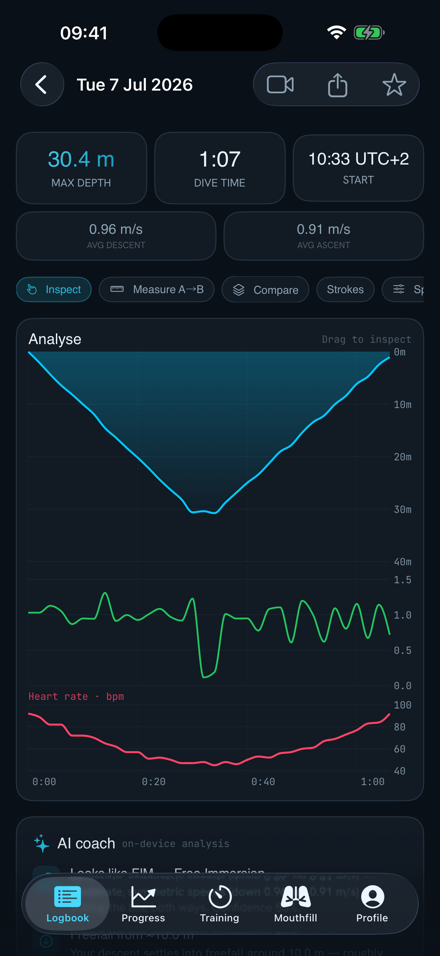
Each dive gets a crisp, interactive profile — descent, turn and ascent, second by second.
- Depth, speed, temperature & heart rate in one view
- Speed shading — the profile line colours by stroke speed, so kick cycles and glides stand out
- Stroke & kick counts on descent and ascent
- Measure A→B — drag on the chart for split speeds
- Overlay unlimited dives to compare sessions
- Search in plain English — "dives over 50m in Dahab"
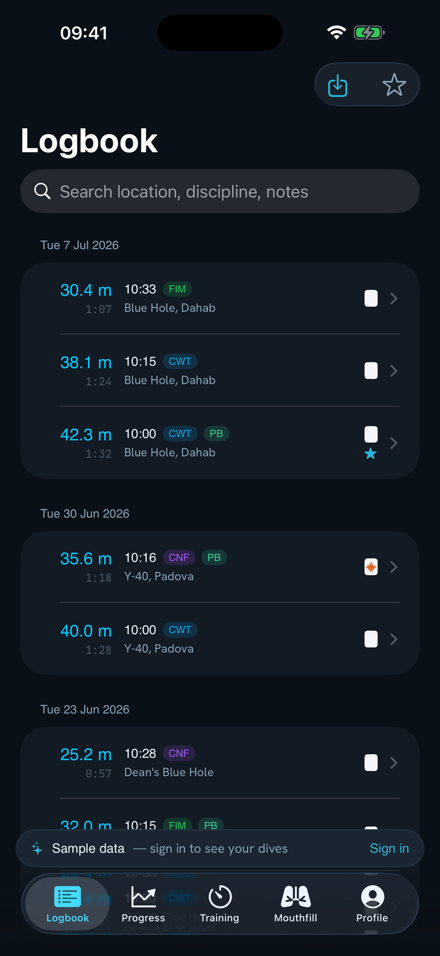
A logbook that's actually yours
Every dive is private by default, organised by day, and enriched with everything you'd write in a paper logbook — but searchable.
- Notes, tags, locations & outcomes (OK, samba, blackout — so you can spot patterns)
- Personal-best flags per discipline
- Share a dive as a read-only link anyone can open — no account needed
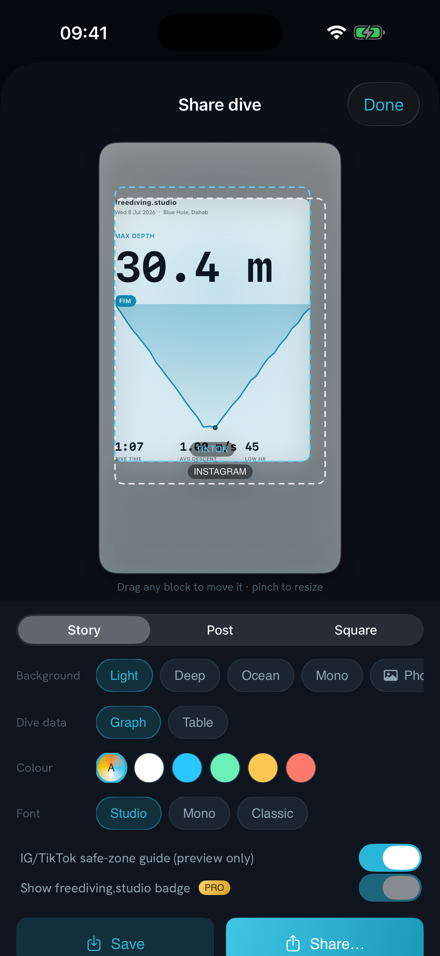
- Share as an image — a designed card of your dive profile for Instagram, TikTok or Stories
- Invite your coach to view your dives and leave comments on specific dives
Insights on every dive, automatically
The moment a dive is imported, the AI coach reads it: it suggests the discipline (CWT, CNF, FIM…), finds your freefall point, flags hangs, spots the thermocline, and comments on descent/ascent pacing. Analysis runs on your device — your dive data isn't sent anywhere for it.
- Milestone reports — every 10 new dives the coach writes up what stood out: personal bests, deepest-ever rankings, descent-speed trends, your busiest month. Free for everyone, collected behind the 🧠 button
- Accept or reject the suggested discipline with one tap
- Rate any insight 👍/👎 to make the coach better
- With PRO: written dive summaries, season reviews, a coach you can ask anything, and AI-built tables designed around your max hold
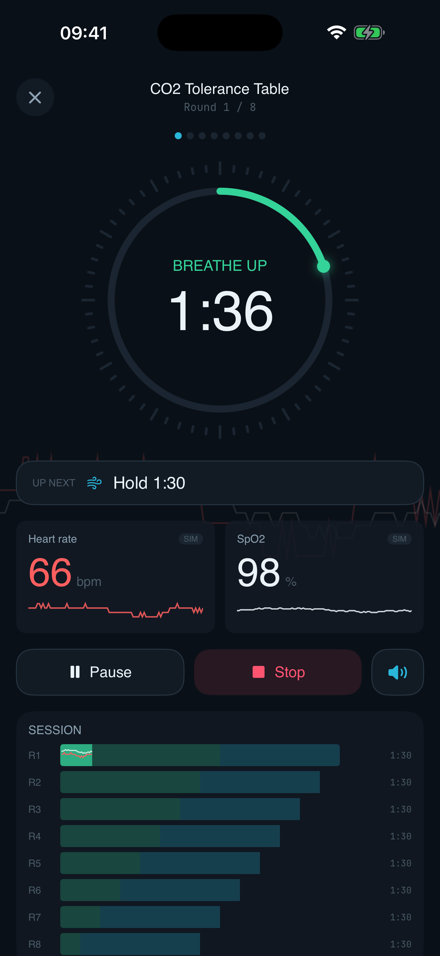
Breath-hold training that talks you through it
Dry CO₂ and O₂ tables for the sofa, the beach or the boat — guided out loud so you can close your eyes and relax.
- CO₂ tolerance & O₂/hypoxia tables, auto-scaled to your max static hold
- Custom tables — build your own rounds and share them with a link
- Voice-coached full-screen player with breathe/hold cues
- Live heart rate & SpO₂ from a Bluetooth pulse oximeter or HR strap
- History & stats for every session, synced across devices
Watch yourself get deeper
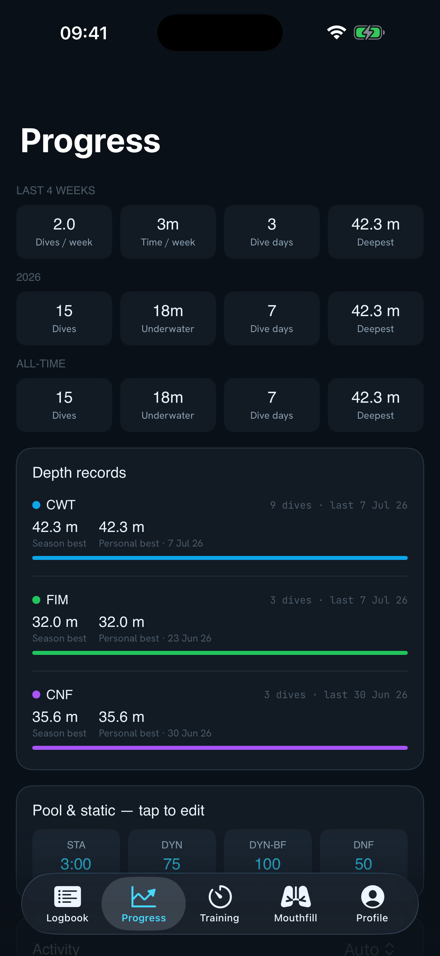
A dashboard of your journey: personal bests by discipline, depth over time, dive counts and training streaks — all computed from your real dives, nothing to fill in.
- PBs per discipline — depth and static, kept up to date automatically
- Trends across months and seasons
- Synced between web and phone
Plan your equalisation before you dive
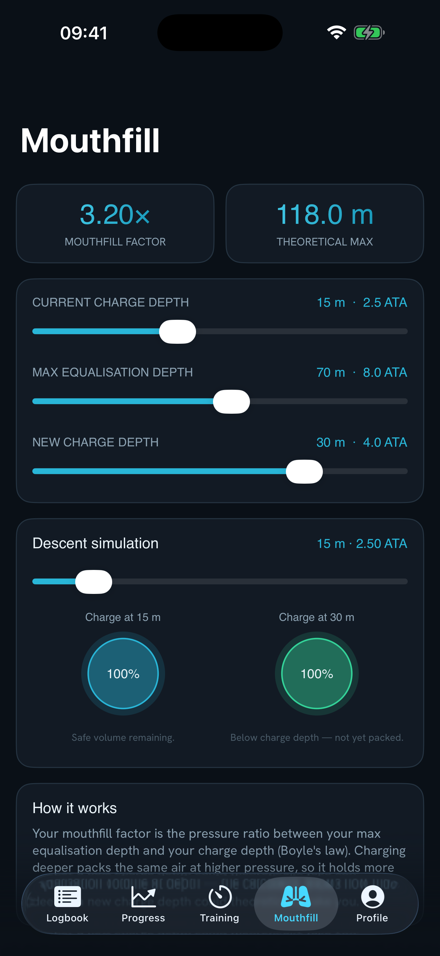
Boyle's-law based mouthfill planning: set your charge depth and max equalisation depth, and see your mouthfill factor, theoretical max and how the air volume behaves through the descent — with an interactive simulation.
Turn your best dives into films
Drop in your footage, sync the dive from your watch, and live stats draw themselves over the video — depth counter, dive-profile trace, speed, timer. Multi-track timeline with trim, split, fade and reorder; framed for Reels, TikTok or YouTube. Everything renders on your device — your footage is never uploaded.
- Live-stat overlays — every metric in every style, draggable and restylable (two per video free, four with PRO)
- Overlay static (dry training) sessions too — heart rate, SpO₂ and contractions
- Export 9:16, 16:9, 1:1 or 4:5 — up to 45 seconds free, 5-minute films and no watermark with PRO
The whole studio, in your pocket
The freediving.studio app brings the logbook, analysis, AI insights, guided training player, progress and mouthfill planner to your phone, on iPhone and Android. Sign in with the same account and everything syncs automatically — log a dive on the boat, analyse it on your laptop.
- Import .FIT files straight from the Files app — and Apple Watch Ultra dives straight from Apple Health
- Bluetooth heart-rate & SpO₂ monitors during training
- Share dive links and image cards from the share sheet
Watches & sensors that work with freediving.studio
Your logbook reads 361 dive computers from 41 brands — search yours here. Any watch that exports .FIT or UDDF files works on every platform, and the Mac app reads most computers directly over Bluetooth, USB or cable. Live heart-rate and SpO₂ sensors for breath-hold training connect over Bluetooth — and what's supported differs a little between the web app and the phone apps.
Dive watches — web, iOS & Android
- Suunto that pairs with the Suunto app — syncs automatically once your Suunto account is connected; no cable, no app
- Garmin (including Descent) — over USB in Chrome/Edge or with the Mac app, or via Garmin Connect file export
- Older cabled Suuntos (D4i, D6i, D9, Zoop, Vyper…) — the Mac app reads them over their USB cable; automatic sync can't reach this generation
- Shearwater, Mares, Cressi, Oceanic and 37 more brands — read directly by the Mac app (Windows version on the way)
- Any other watch that exports .FIT or UDDF files, plus backups from other logbook apps — see the import guide
Live HR & SpO₂ sensors — web app (Chrome or Edge on desktop and Android)
- Heart-rate straps & armbands — Polar H10 / OH1 / Verity, Garmin HRM, Wahoo, Coospo, or any standard Bluetooth HR sensor
- Watch HR broadcast — Garmin, Suunto and Apple Watch (via a broadcast app) pair like a strap
- Pulse oximeters (SpO₂ + pulse) — standard Bluetooth (PLX) units such as the Nonin 3230 · Wellue / Viatom rings (O2Ring, Checkme O2, SleepU, Oxylink) · BerryMed BM1000-family fingertip clips · Jumper JPD-500 family (the “My Oximeter” devices)
iPhone browsers can’t reach Bluetooth sensors (a Safari limitation) — on iPhone, live vitals come with the iOS app.
iOS & Android apps
- Full logbook, import, analysis, training tables and progress — same account as the web, everything in sync
- Bluetooth sensor support in the apps is expanding; the web app currently speaks the widest range of sensors for vitals training
Frequently asked questions
Is freediving.studio free?
Yes — the logbook, analysis, automatic insights, training tables, coach sharing, progress, mouthfill calculator and video studio are free. PRO (£3.99/month) adds the written AI coach — dive summaries, season reviews, chat and AI-built tables — plus full-power video exports: no watermark, up to 4 overlays, films up to 5 minutes.
Which dive watches are supported?
361 dive computers from 41 brands — search yours. Suunto watches that pair with the Suunto app sync automatically; Garmin imports over USB in the browser; the Mac app reads most of the rest directly. See the import guide for per-brand steps and supported devices for the sensor list.
Do I have to export files from my Suunto?
Not if it pairs with the Suunto app (D5, EON, Ocean, Vertical, Race, 9…): connect your Suunto account once in Settings → Import and every dive — your whole history included — arrives on its own. Older cabled Suuntos (D4i, D6i, D9…) predate the Suunto app, so for those the Mac app reads the watch over its USB cable instead.
Do my videos get uploaded?
No. The video studio renders entirely on your device. Dive data syncs to your private account; video files stay local.
Are my dives public?
No — private by default. You choose what to share: a read-only dive link, a social image card, or a coach invitation.
Is there an Android app?
Yes — get it on Google Play. Same account as the web and iOS apps, everything in sync.
How do I get help?
Email hello@freediving.studio — we read everything.
Try it with your own dives
Free, private by default, and you'll see your first dive profile in under a minute.
Open freediving.studio